

Mind Map Summary: Create Summary Nodes Across Branches and Extend Them into New Branches
1 What Is Summary?
💡 Summary — A Smart Tool for Structured Synthesis:
The Summary feature consolidates multiple mind map cards to generate a new summary card that captures the core content and distills the key points. When a mind map is organized primarily as a hierarchy, Summary enables vertical integration and horizontal comparison of knowledge, weaving scattered concepts into a clear logical thread.
In addition, the generated summary card can be further extended into new tree branches, supporting divergent thinking and cross-topic expansion to help you build a more systematic and in-depth knowledge network.
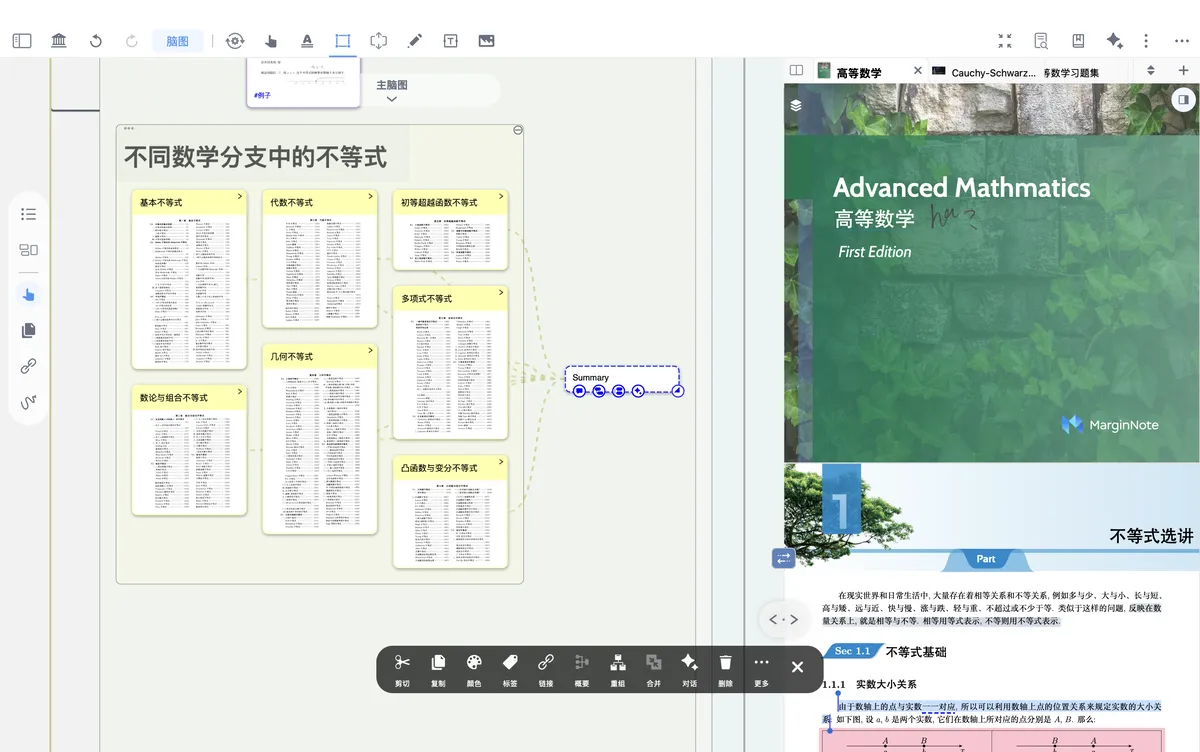
2 How to Generate a Summary Card
Hand tool - Mind map
- Tap the hand tool in the mind map side toolbar (shown by the icon above)
- Select the cards you want to summarize
- In the multi-select toolbar at the bottom, tap
Summaryto automatically generate a new card

- In addition, the newly generated summary card can be used to create new tree-shaped mind map branches
- You can also drag it directly onto another card to automatically turn it into a link